

Test suites
A suite is a functional area of the application, such as Purchasing, Asset or Work Management. Each test belongs to at most one suite. Suites are used to:
- filter the test list,
- group statistics on the dashboard (Tests by module),
- organize a large regression set that covers a big packaged application.
Managing suites
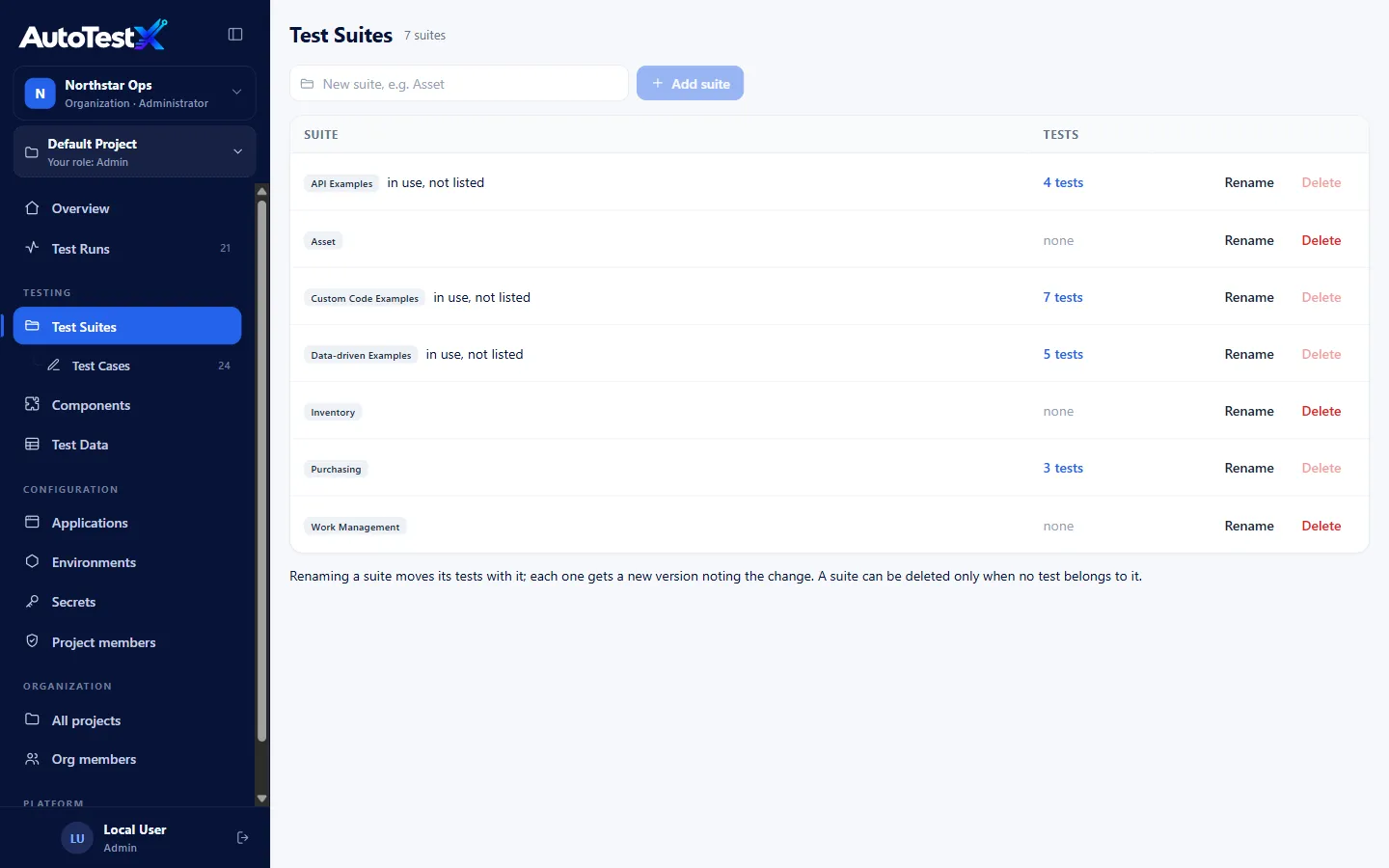
Section titled “Managing suites”Test Suites in the sidebar lists the project’s suites and how many tests each holds. You need the Manage test suites permission (Test Developer and above).
| Action | How | Notes |
|---|---|---|
| Add | Type a name in New suite, e.g. Asset, then Add suite | |
| Rename | Rename on the row | Moves every test in it to the new name. Each test gets a new version noting the change. |
| Delete | Delete on the row | Only possible when no test belongs to the suite |
A suite marked in use, not listed is named by tests but missing from the project’s suite list, for example after an import. Add it to the list to manage it here.
Putting a test in a suite
Section titled “Putting a test in a suite”Choose the suite when you create the test, or later in the editor under Test settings → Suite. Choose Unsorted for none.
Note: a suite groups tests. It is not yet a way to run several tests together. To run a set of tests in one go, use the CLI in a CI pipeline.