

Data-driven testing
A data-driven test runs once per row of a data source. Each row is a separate execution with its own fresh browser, variables and screenshots, and all rows are reported together as one run.
Binding a data source
Section titled “Binding a data source”In the editor open Test settings → Data source and choose:
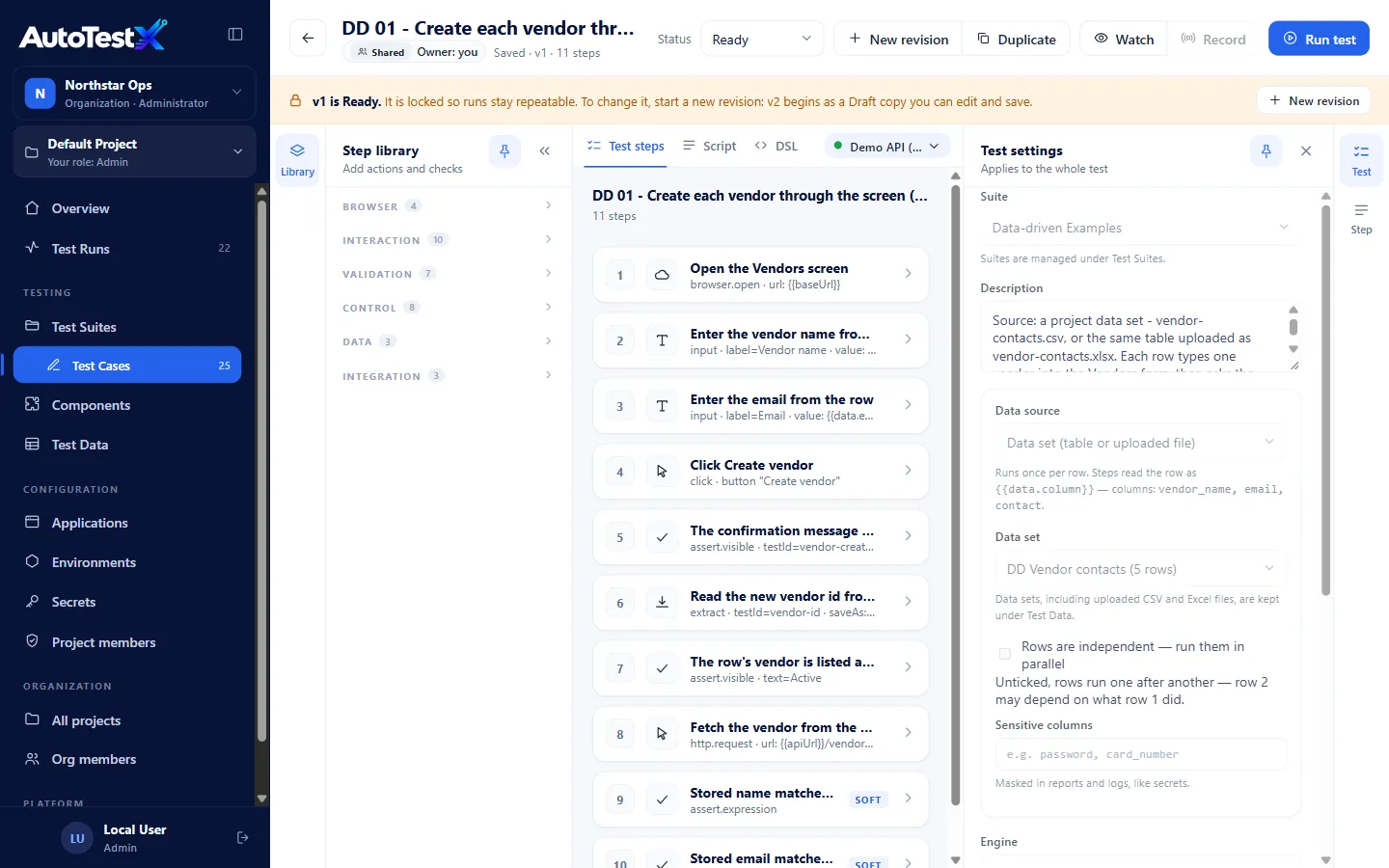
| Data source | Settings |
|---|---|
| None — run once | Not data-driven (default) |
| Data set (table or uploaded file) | Choose a data set |
| Inline table | Type rows as CSV in the test itself. The first line is the column names. |
| HTTP request | Method, URL (e.g. {{apiUrl}}/customers?status=active), optional headers and Body, and Rows path: an expression over response that gives the list of rows, e.g. response.body.items. Leave it empty if the body itself is the list. |
| Data pool (leased records) | Choose a pool, Rows to run (how many records to lease), and After a row: Consume the record or Return it to the pool |
Then, for every source:
| Option | Meaning |
|---|---|
| Rows are independent — run them in parallel | Tick only if no row depends on what another row did. Unticked, rows run one after another. |
| Rows at once | With parallel rows, how many run at the same time. Empty means the platform default (4). The server may cap it lower. |
| Sensitive columns | Columns masked in reports and logs like secrets, e.g. password, card_number |
Using row values in steps
Section titled “Using row values in steps”Steps read the current row as {{data.<column>}}:
| Where | Example |
|---|---|
| A value to type | {{data.vendor_name}} |
| A URL or request body | {{apiUrl}}/vendors/{{data.vendor_code}} |
| An expected value | {{data.expected_total}} |
| A condition | data.case == 'missing name' |
| A target’s row key | Scope to container: role row, key {{data.vendor_name}} |
A locator’s own value (
label = Username) is matched literally.{{…}}is not substituted there. To find “the row for this vendor”, put{{data.vendor_name}}in the row key and match literal text inside the row.
data. is reserved only when a data source is bound. In a test without one, a variable
called data keeps its ordinary meaning.
What happens when you run
Section titled “What happens when you run”- Before any row runs, the server resolves the rows: reads the data set, calls the HTTP source once, or prepares the pool.
- If a step uses
{{data.x}}and the source has no columnx, the run is refused up front with one clear error, rather than failing every row the same way. - Each row runs in its own fresh browser context with its own variables.
- A failed row never stops the others.
- The run’s status is Passed only if every row passed. Any failed row makes it Failed; errors alone make it Error; an empty source is never green.
- Watch turns parallel rows into one-at-a-time, so you can follow along.
The run report shows one line per row with its inputs, result and the step it failed at.
From the command line
Section titled “From the command line”npm run atx -- run test.json --env env.json --data rows.csv --concurrency 3--data accepts a CSV with a header row or a JSON list of objects. Without --data, an
inline table in the test is used. Data sets, HTTP sources and pools live on the
server, so for those pass the rows with --data. See CLI.
Examples
Section titled “Examples”examples/data-driven/ contains one test per source type, runnable against the demo API.
Import them with npm run seed:data-driven-examples (see
Data, backup and seeding):
| Example | Source | Shows |
|---|---|---|
| DD 01 | Data set (CSV / Excel) | Typing each vendor into a screen, rows one at a time |
| DD 02 | Data set | API order totals, 3 rows in parallel |
| DD 03 | HTTP request | Every catalog item becomes a row |
| DD 04 | Data pool | One unique vendor per leased record, consumed |
| DD 05 | Inline table | Positive and negative API validation cases |