

Troubleshooting
Start with the run report: expand the first failed step, read its error, and look at its screenshot and the one before it. See Reading a failure.
A step cannot find its element
Section titled “A step cannot find its element”Error: No strategy resolved to a usable element in the page or any of its N frame(s). Tried: label=“Username” -> 0
-> 0 is how many elements each strategy matched.
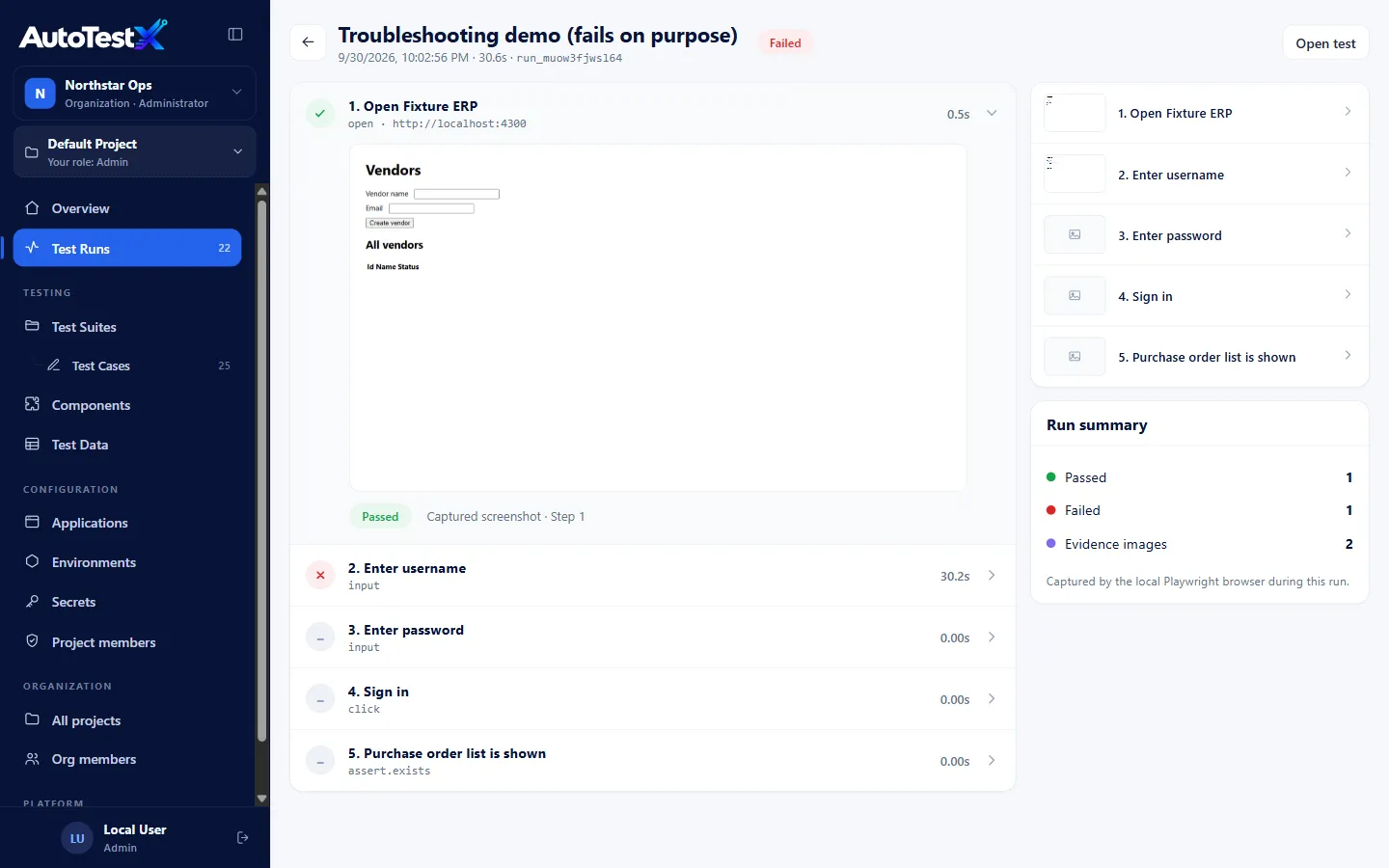
Above: step 1 opened http://localhost:4300 (the Demo API) instead of the Fixture ERP
app, because the wrong environment was selected. Step 2 then could not find “Username”.
| Check | How |
|---|---|
| Is the run on the right environment? | The editor’s environment selector starts on the first environment in the list. A run against the wrong application fails exactly like this, usually on the first element after Open. Check step 1’s detail in the report: it shows the real URL opened. |
| Is the page the one you expect? | Look at the screenshot of the step before the failure. A login that silently failed, a pop-up or an error page is visible there. |
| Has the screen changed? | Use Pick on the step to capture fresh locators. |
| Does it match several elements? | -> 3 means ambiguous. AutoTestX does not guess unless exactly one is visible. Add a scope (e.g. the grid row by key) or a more specific strategy. |
| Is it in an iframe or a lookup window? | Pick records the frame path. For lookup dialogs, use a Lookup step. |
| Is it there, just slowly? | Increase the step Timeout, or add Wait for element before it. |
A missing element takes about the whole step timeout to fail (30 s by default), because the first strategy is given the full time to appear.
The step passes but shows a warning (!, “Fallback locator”, DRIFT)
Section titled “The step passes but shows a warning (!, “Fallback locator”, DRIFT)”The first locator no longer works and a fallback found the element. Refresh the target with Pick, or move the working strategy to the top. See Degraded resolution.
Unresolved reference
Section titled “Unresolved reference”Error: Unresolved reference “x”. Check the variable name and that an earlier step assigned it.
| Reference | Check |
|---|---|
{{secret.NAME}} |
The selected environment has a secret with exactly that name (case-sensitive). The Secrets page shows Missing ones. |
{{baseUrl}} etc. |
The environment’s Variables (JSON) define it. A run with No environment has no environment variables. |
{{poNumber}} |
The step that sets it (Extract, Set variable, HTTP saveAs) ran before this step, and was not skipped or failed. |
{{line.x}} |
You are inside the For each that defines line. Component steps cannot see the caller’s loop variables; pass them as arguments. |
{{data.x}} |
The test has a data source and it has a column x (exact name). |
Expression errors
Section titled “Expression errors”| Error | Fix |
|---|---|
| Cannot compare string with number | Values from the page are text. Use NUMBER(total) == 49.5. |
| Operator “+” requires numbers | Join text with CONCAT(a, b) |
| Operator “AND” requires a true/false value | Write an explicit comparison: count > 0 AND … |
| Condition “…” produced string, expected true or false | A condition must compare something, e.g. status == 'Approved' |
A regex never matches, or Unknown escape "\d" in string literal |
In an expression, double the backslashes: '^PO-\\d+$'. A single \d is rejected as a syntax error, not dropped. In a template field (for example Text → expected with match regex), type the pattern normally: ^PO-\d+$. See Expressions. |
| Unknown function “X” | The message lists available functions |
Assertion failed
Section titled “Assertion failed”The report shows expected and actual side by side. Common causes:
- extra whitespace or a different case: use match contains, or a regex,
- the value had not updated yet: add Wait for element or use retries on the assertion,
- the assertion checked the wrong element: confirm with Pick.
Run is slow to start
Section titled “Run is slow to start”The first run after a server start creates the browser. Later runs use warm pages
(ATX_POOL_SIZE, default 2). If many people run at once, raise the pool on a larger
server. See Configuration.
Record, Pick or Watch does nothing / asks for the agent
Section titled “Record, Pick or Watch does nothing / asks for the agent”| Symptom | Fix |
|---|---|
| Set up the AutoTestX Agent | The server opens visible browsers through the agent. Install it. See The AutoTestX Agent. |
| Your AutoTestX Agent is not running | Start AutoTestX Agent from the Start menu, or sign out of Windows and back in. Check the VPN. |
| The agent will not install | SmartScreen or endpoint protection blocked the unsigned file. Ask your administrator to sign it (ATX_AGENT_SIGN_SCRIPT) or allow it. |
| Still failing | Read %LOCALAPPDATA%\AutoTestX\agent.log |
| Server on your own PC, no browser appears | ATX_VISIBLE_BROWSER may be agent. Use auto or local for a local server. |
| Could not open the page | The Application URL is unreachable from the computer the browser opens on. Check the address and VPN. |
Write with AI says it is not connected
Section titled “Write with AI says it is not connected”Set ANTHROPIC_API_KEY for the server and restart it. See
Write with AI.
Cannot save the test
Section titled “Cannot save the test”| Message | Meaning |
|---|---|
| Cannot save: n error(s) | Validation errors. A red dot on the Step rail button marks the step; its panel lists the problems. |
| v3 is Ready — create a new revision to change it | Ready versions are frozen. Use New revision. |
| Only a Test Manager or Admin can change whether a test is Ready or Deprecated | Ask a Test Manager to change the status |
| Your role does not allow editing this test | Testers can edit only tests they own. Duplicate it to work on a copy. |
| Custom code: Line N: … | The code does not compile. Fix the line shown. |
Data-driven runs
Section titled “Data-driven runs”| Symptom | Fix |
|---|---|
Run refused: the data has no column x |
A step uses {{data.x}}. Rename the column or the reference. Names must match exactly. |
| Run is Error with 0 rows | The source was empty. An empty source is never reported as passed. |
| Pool rows cannot lease a record | All records are consumed or leased. Test Data → Data pools → Restore consumed (or Release leases if a run crashed). |
| Rows interfere with each other | Untick Rows are independent so they run one after another, or give each row unique data. |
| A just-seeded pool or data set does not appear | The seed script ran while the server was running. Restart the server. See Seeding. |
Uploading a large data file fails
Section titled “Uploading a large data file fails”The deployment’s nginx accepts request bodies up to 25 MB (client_max_body_size).
Split the file, or raise the limit in /etc/nginx/sites-available/autotestx.
Sign-in problems
Section titled “Sign-in problems”| Symptom | Fix |
|---|---|
| Too many failed attempts | Wait 15 minutes, or reset the password |
| Nobody can sign in on a new server | Claim local@localhost with Forgot password? and read the link in the server console / journalctl -u autotestx |
| Reset links point to the wrong address | Set ATX_PUBLIC_URL to the public https:// address and restart |
| Signed out unexpectedly | Sessions end after 12 hours idle or 7 days, and when your password changes |
Server
Section titled “Server”| Symptom | Fix |
|---|---|
| Deploy health check fails | ssh … "sudo journalctl -u autotestx -n 50" |
| Live run results do not stream behind a proxy | The proxy must not buffer /api/runs/*/events (nginx: proxy_buffering off) |
| Agent cannot connect behind a proxy | The proxy must allow WebSocket upgrade on /api/agent/connect |
npm run deploy -- -SkipTests ignored |
PowerShell drops the --. Use npm run deploy:skip-tests. |
| Disk filling up | Old screenshots in runs/. See Backup. |
Still stuck?
Section titled “Still stuck?”Collect the run id (shown in the report header), the step’s error message and screenshot, and the server log around that time, and give them to whoever maintains your AutoTestX installation.