

Component maintenance queue
The maintenance queue shows which components need a person, why, and what to do about each one. It is at the top of the Components page.
A component is called from many tests, so one broken locator inside Login turns every caller red. The dashboard lists each failing test on its own. The queue traces those failures back to the component step they share and lists it once, with a recommendation.
What the queue looks at
Section titled “What the queue looks at”The queue is worked out fresh each time you open the page. It reads:
- the latest run of every test you can see that calls a component,
- the self-healing fixes waiting for review on component steps,
- each component’s callers, and which version each one is pinned to,
- the component’s source test, compared step by step with the latest published version.
Nothing is stored, so the queue always matches the runs and components as they are now. Once a caller passes again, or is upgraded, its finding disappears.
Findings and recommendations
Section titled “Findings and recommendations”| Finding | It means | Recommendation |
|---|---|---|
| Failing | A step inside the component failed in the latest run of one or more callers. | Depends on the failure class (next table). |
| Fix waiting | Self-healing found a new locator for a component step, and it is waiting for review. | Approve the fix. That publishes the next version. A high-risk fix says to check it against the page first. |
| Drifting | A component step passed, but only through a fallback locator. | Re-record or reorder the step’s locator in the source test and publish, before the fallback stops matching too. |
| Unpublished | The source test’s steps differ from the latest version. Callers do not see the change yet. | Once the change is verified, publish it as the next version. |
| Outdated callers | Some callers are pinned to an older version than the latest. | Review the upgrade. It tells you how many tests can move now and how many are held back (Ready, deprecated, or missing a new required parameter). |
| Unused | No test calls the component. | Delete it if nothing will call it again. |
A Failing component’s recommendation depends on what kind of failure it was. A step inside a component is not always where the problem is:
| Failure class | Recommendation |
|---|---|
| Locator, wrong value, timeout, unclassified | Fix and publish: fix the step in the source test, run it until it passes, publish the next version and upgrade the callers. |
| Server error, Maximo business rule, authentication, environment | Investigate the application: the application is the likely cause, not the component. Do not publish a new version for it. |
| Test data | Check the test data: refill the data source or pool. The component is fine. |
| (any, with a fix waiting) | Review the fix: self-healing already found a new locator for the failing step. The failure and the fix are listed as one finding. |
A component that is failing is not also listed as drifting.
Reading a finding
Section titled “Reading a finding”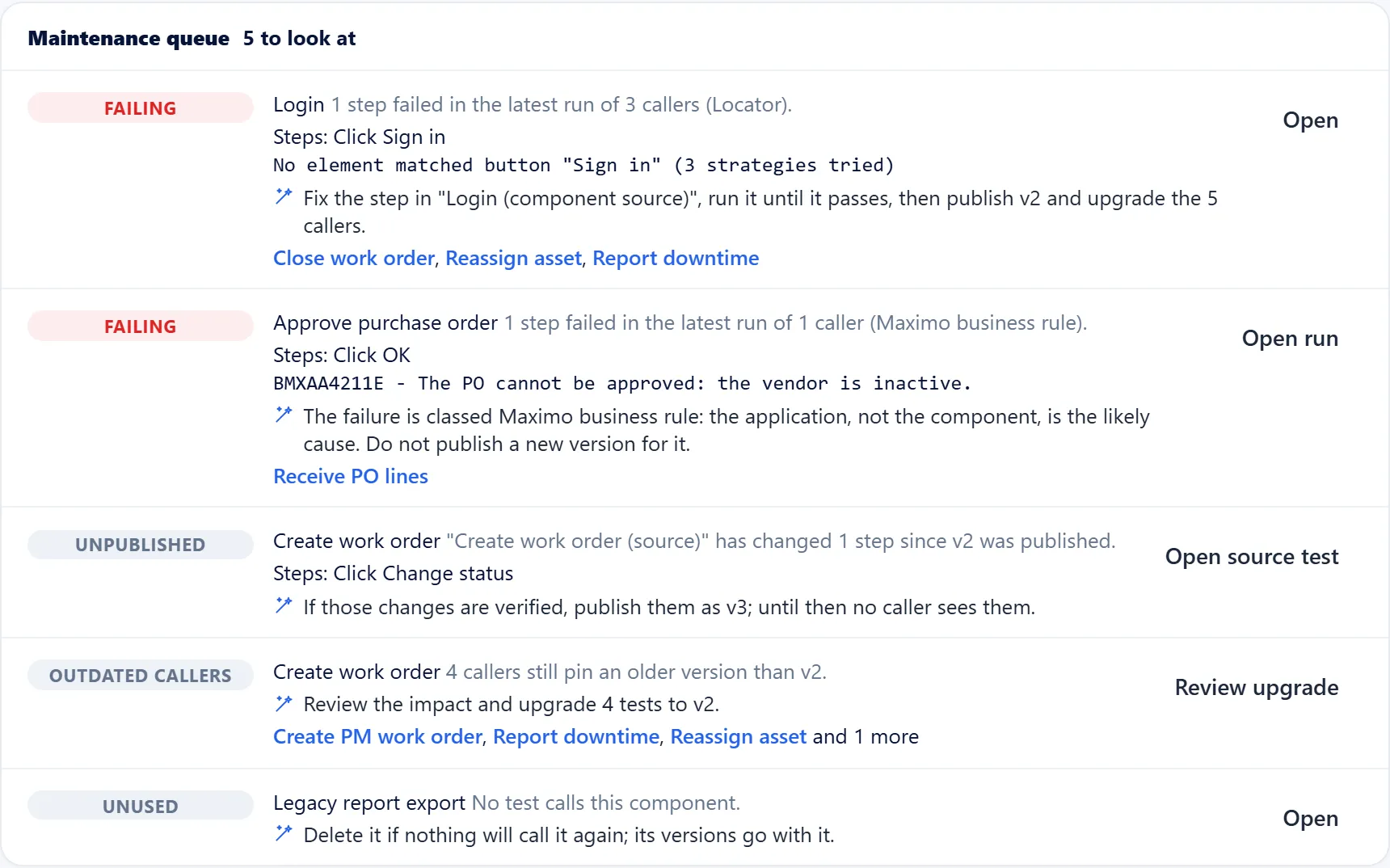
Each row shows:
- the finding (Failing, Fix waiting…) and the component, which links to its page,
- a one-line summary, e.g. “1 step failed in the latest run of 2 callers (Locator).”,
- the steps involved and, for a failure, the first error message,
- the recommendation,
- up to three of the tests behind the finding. Private tests of other members are counted, never named.
The button on the right opens the place where you act on the recommendation:
| Recommendation | Button | Opens |
|---|---|---|
| Review the fix | Review fix | Self-healing |
| Investigate the application, check the test data | Open run | The failing run’s report |
| Publish | Open source test | The component’s source test |
| Upgrade callers | Review upgrade | The component page, where Review upgrade to vN is |
| Fix and publish, delete | Open | The component page |
The queue shows the 5 most urgent findings first. Show all lists the rest.
The most urgent finding comes first. A broken component always comes before housekeeping:
- What is broken now comes before what will break (drift), and both come before housekeeping (unpublished changes, outdated callers, unused components).
- A finding that reaches more tests ranks higher, with diminishing returns: 1 caller counts less than 3, but 400 callers count no more than 5. Forty outdated callers never outrank a failure.
- A failure the component’s owner cannot fix (server error, Maximo business rule, authentication, environment, test data) ranks below one they can.
From an AI assistant
Section titled “From an AI assistant”The MCP tool component_maintenance returns the same
queue, so you can ask your assistant “Which AutoTestX components need maintenance?”. It
only reads: you act in AutoTestX.
Practise
Section titled “Practise”The component maintenance exercises walk through every finding with a sign-in page you can break on purpose.
Permissions
Section titled “Permissions”Anyone who can see the Components page sees the queue. Acting on a recommendation needs the usual permission: publishing, upgrading and deleting need Create, publish and upgrade reusable components; approving a heal needs the self-healing review permission.