

Choosing a plan and signing up
This page follows the path from picking a plan on the pricing page to having that plan active on your organization. Steps marked Planned are not built yet. They show how the journey will work when they ship. Everything else works today.
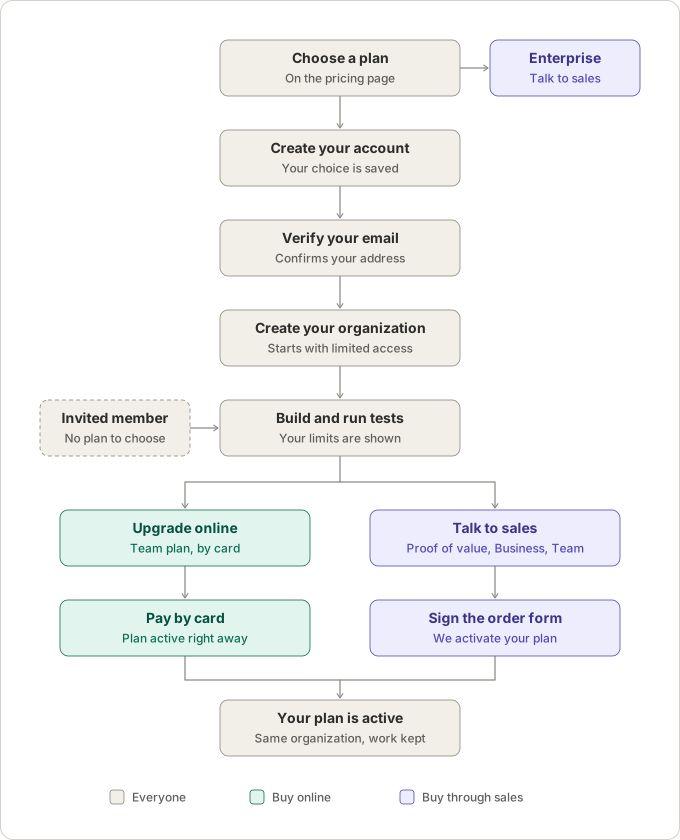
The steps
Section titled “The steps”| Step | What happens | Status |
|---|---|---|
| 1. Choose a plan | On the pricing page, pick Free, Team or Business. Choosing a plan does not charge you anything. Enterprise goes straight to sales. | Planned (today every plan opens a conversation with us) |
| 2. Create your account | Enter your name, email and a password. The plan you chose is remembered as a request. | Account creation works today; remembering the plan is Planned |
| 3. Verify your email | Open the link we email you, to confirm the address is yours. | Planned |
| 4. Create your organization | Name your organization and its first project. It starts on Free: one authoring seat, one project and 100 AI generations a month, until a paid plan is confirmed. | Works today |
| 5. Build and run tests | Use the editor, the recorder and the AI step writer. The plan screen shows your AI generations used this month and the plan you requested. | Works today; the requested plan banner is Planned |
| 6a. Upgrade online | Team only: confirm the plan and billing period, then pay by card. The plan is active right away. | Planned |
| 6b. Talk to sales | Business, and Team until online payment is available: we contact you, send an order form, and activate your plan once it is signed. | Works today |
| 7. Your plan is active | Your organization’s limits change to the new plan. Your tests, runs and schedules are kept. | Works today |
People you invite do not choose a plan
Section titled “People you invite do not choose a plan”Only the people who build tests use paid authoring seats. Testers who run tests and Viewers who read the results are free and unlimited. When an administrator invites someone through Org members → Invite, that person sets a password from the invitation email and goes straight into the organization. They never see a plan or a payment step. See First sign-in → Add other people.
Good to know
Section titled “Good to know”- Choosing a plan never charges you. Payment happens only when you confirm it, online or by signing an order form.
- Nothing you build is lost when your plan changes. The plan changes on the same organization.
- Going over the AI allowance never stops your tests. You are warned at 80% of the monthly AI generations. Past 100% there is a 10% margin, then AI features (step writing, diagnosis and AI healing) pause until the next month or a top-up. Building tests by hand and running them never stop.
- Moving to a smaller plan may ask you to pause some schedules, revoke some API tokens, delete projects, free authoring seats or remove your own AI key first, so that you choose what stops, not the plan change.
- Rules that apply healing fixes on their own come with Business. On other plans a rule can require review, reject fixes, or run in dry-run to show what it would have applied.